-

Member
How to easily play Icecrown Warmane on LINUX.
Hi guys, easy guide here to play Icecrown on Debian-based distros like Debian, Ubuntu, Linux Mint, easily.
1. Have Linux Installed, I chose Linux Mint Mate due to the desktop environment being more light than Ubuntu or Mints default.
2. Download the SNAP version of Steam. Steam from the SNAP app store.
3. Open and login to Steam.
4. Add WoW.ext to Steam.
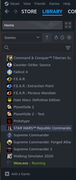
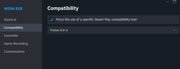
5. Set Wow.exe to use Proton compatibility tool. Almost any version seems to work.
*optional* If your game is freezes, it may be due to the GPU driver version. I use NVIDIA GPU and I had to set an older driver. For your specific GPU driver, you may need to try a Newer driver, or an older driver, just try a different driver version that what your currently using if your getting in-game freezing.
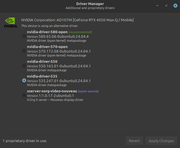
I set mine to 535 and it works perfectly.
Start game, and enjoy =)
 Posting Permissions
- You may not post new threads
- You may not post replies
- You may not post attachments
- You may not edit your posts
-
Forum Rules

 Quote
Quote