I am having a game issue in which my game crashes every time I log in/approach the Horde PvP vendor in Pandaria.
The crash is random, does not always happen(but does most of the time) I can't predict it nor do I know why is it crashing.
It has been happening ever since Prideful set has been released.
Image of the crash report.
Spoiler:Show
Did anyone else experience the same/similar problem, did you fix it and how?
-
Member
Game crashes at Horde PvP vendor in Pandaria
-
Member
I used to get that error. Except it wasn't just the honor vendor, but the bank, the auction, or pretty much any time I had to open an interface window of any kind. I spent several days looking for an answer and found this to be the solution:
1. Navigate to your Mists of Pandaria folder's WTF directory and open the config using Notepad:
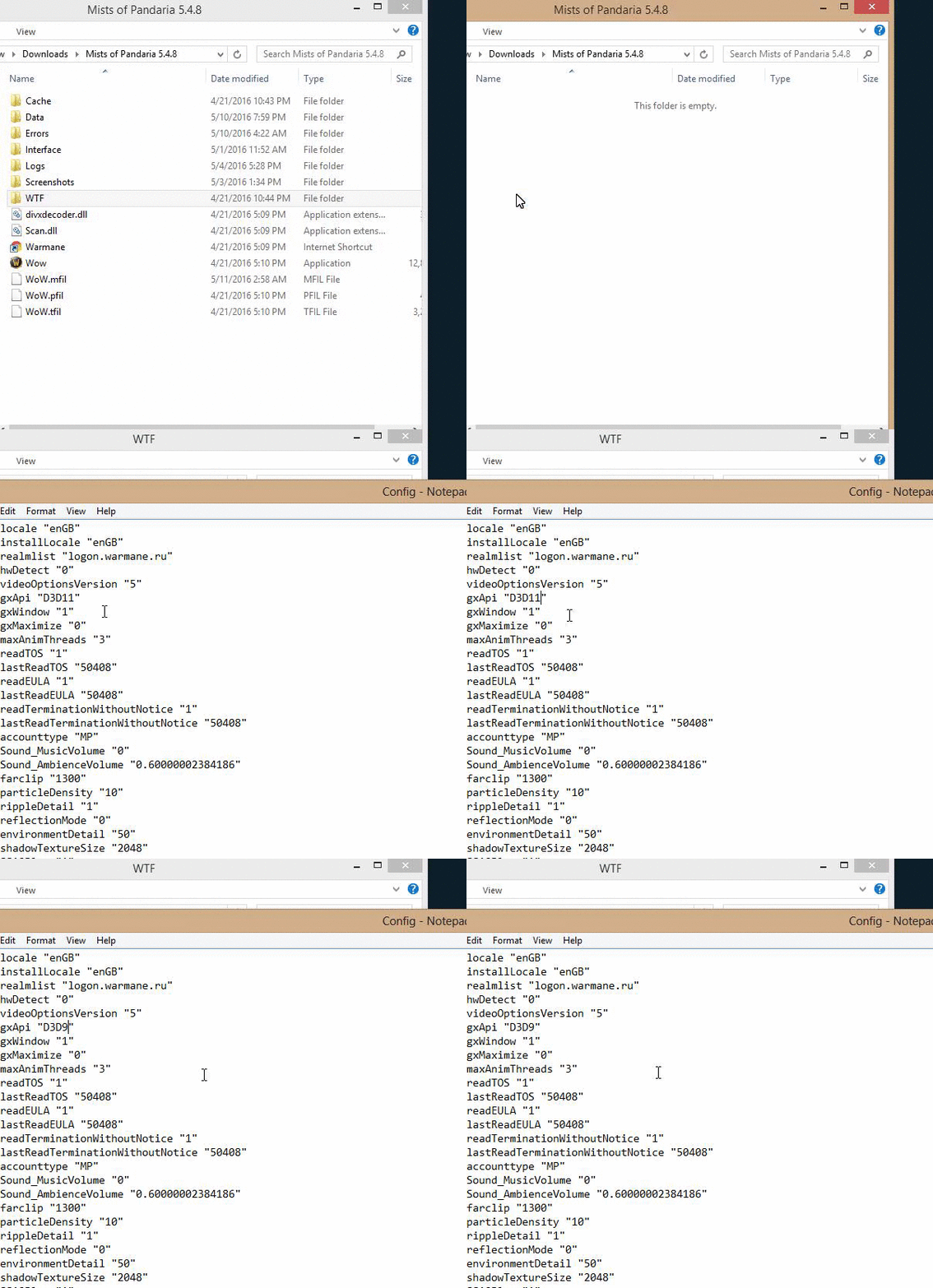
2. Locate "SET gxApi "D3D11" and change it to "SET gxApi "D3D9" then save. Make sure WoW is not open while you're doing this.
Doing this will cause the game to not run quite as smoothly as before, but it also made the crashing stop completely. Try it and let me know if it works for you as well.Edited: May 12, 2016
-
Member
having same problem and setting it to directx9 didnt help either c: now i gota damn cd on unstuck so im here qqing q.q
-
 Member
Happening to me everytime I log on my Monk. I cannot ****ing log in without crashing. Googled it, tried everything, nothing worked.
Will anyone from Warmane staff clarify?
Also opened a ticket in-game with another char.
-
Member
This is happening to me too, same error from the screenshot. If more people are getting this error, i'm guessing it has to be some server-side issue.
-
Member
Until they answer,unstucking your char from the website helps, so you can at least play...
-
Member
Same prob. Error #132.
Unstuck on CD. Cant buy from vendor. :(
-
Member
Works for me! Thanks for help.