-

Member
Camera spinning uncontrollably when holding right mouse button on Mac (Parallels
Hi everyone,
I’m looking for some help because I can’t fix a really frustrating issue.
I’m playing on a Mac with an M2 chip using Parallels Desktop. The game runs, but when I hold the right mouse button, the camera starts spinning uncontrollably, making the game basically unplayable.
I already tried:
- switching to windowed mode (this worked once in the past, but not anymore)
- disabling and re-enabling all mouse and camera-related options one by one, testing each time
Unfortunately, the problem is still there.
This has happened to me before and after a lot of trial and error it somehow fixed itself, but every time in a different way, so I can’t figure out what actually solves it.
Has anyone experienced this on Mac + Parallels or knows a proper fix?
Thanks in advance!
-

Rock n' Roll Racing Champion
You have to change this setting
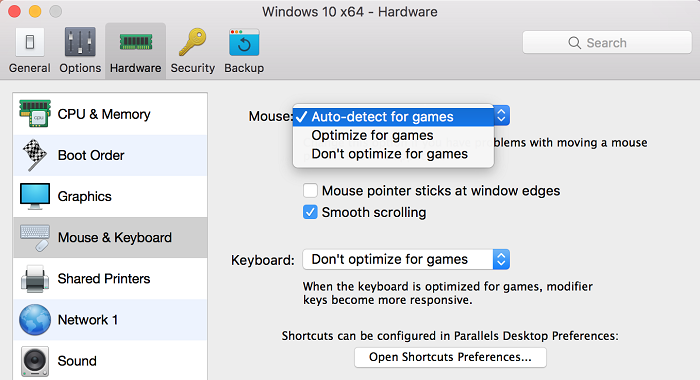
(This is an old screenshot, the setting may have been moved, but it's somewhere)
-
Member
Oh I had this option, changed it to Optiimize for games and now it works .... :D Great!
VM Ware Fusion
Settings > General > Gaming > Always optimize mouse for games
 Posting Permissions
- You may not post new threads
- You may not post replies
- You may not post attachments
- You may not edit your posts
-
Forum Rules

 Quote
Quote